
Performance Optimization
How to improve FPS and reduce lag in Garry's Mod with graphics and launch settings
Performance Optimization
Getting low FPS or experiencing lag? This guide covers the best settings and tweaks to improve Garry's Mod performance on any PC.
Start with the quick fixes below, then move to advanced tweaks if needed.
Quick Fixes
Switch to 64-bit
Enable the x86-64 branch in Steam. Full guide here.
Use CATALYST (KORDU Servers)
On KORDU/Justified servers, type /boost in chat or catalyst_enabled 1 in console. This auto-optimizes your settings.
Lower Your Settings
In Options → Video → Advanced, set most options to Low.
Turn Off VSync
VSync can add input lag. Disable it unless you have screen tearing.
Enable Multicore Rendering
Turn this on in video settings AND in console (see below).
Recommended Video Settings
These settings are in Options → Video → Advanced:

| Setting | Recommended | Notes |
|---|---|---|
| Model Detail | Low | On some servers, Low breaks addon UIs — KORDU fixes this |
| Texture Detail | Low | See note below |
| Shader Detail | Low | Helps FPS |
| Water Detail | Simple Reflections | Big FPS saver |
| Shadow Detail | Low | Big FPS saver |
| Color Correction | Disabled | Slight FPS gain |
| Antialiasing Mode | None | Significant FPS gain |
| Filtering Mode | Bilinear | Trilinear/Aniso cost more |
| Wait for Vertical Sync | Disabled | Unless you get tearing |
| Motion Blur | Disabled | Wastes FPS |
| Multicore Rendering | Enabled | Always on |
| High Dynamic Range | None | Can help older PCs |
KORDU/Justified Servers
Type /boost in chat or catalyst_enabled 1 in console to automatically optimize your settings. This handles most of the work for you!
KORDU Texture Note
KORDU DarkRP servers optimize all materials to 1K textures or below. You'll see little difference between High and Low texture settings on our servers — feel free to use Low for better performance.
For DarkRP in general, most players won't notice quality differences at Low settings. Prioritize FPS over visuals.
Launch Options
Add these to your Steam launch options:
-high -novid -nojoy +exec autoexec.cfg| Option | Effect |
|---|---|
-high | Run at high CPU priority |
-novid | Skip intro video |
-nojoy | Disable joystick (saves memory) |
+exec autoexec.cfg | Run your custom config |
To enable 64-bit, use the Steam Betas tab, not launch options. See the 64-bit guide.
Console Commands for Performance
Open console (` key) and try these:
| Command | Effect |
|---|---|
gmod_mcore_test 1 | Enable multicore rendering |
mat_queue_mode 2 | Threaded material system |
cl_threaded_bone_setup 1 | Threaded bone processing |
cl_threaded_client_leaf_system 1 | Threaded leaf system |
r_threaded_client_shadow_manager 1 | Threaded shadows |
r_threaded_particles 1 | Threaded particles |
r_threaded_renderables 1 | Threaded renderables |
r_queued_ropes 1 | Threaded rope rendering |
studio_queue_mode 1 | Threaded studio models |
cl_forcepreload 1 | Preload all resources |
fps_max [refresh rate] | Lock FPS to your monitor (e.g., fps_max 144) |
Set fps_max to your monitor's refresh rate (60, 144, etc.). No point pushing higher — it just wastes GPU power.
Add these to your autoexec.cfg to apply on every launch.
Addon Management
Too Many Addons = Lag
Every subscribed addon loads, even if the server doesn't use it. This also causes longer load times when joining servers.
The Problem
If you've joined multiple different servers and downloaded their workshop content, your GMod has accumulated addons you don't need. This slows down loading and can cause errors.
Best Practice for KORDU Servers
For the fastest load times and fewest errors:
- Unsubscribe from all addons you don't actively use
- Subscribe only to KORDU content packs:
- Restart GMod after making changes
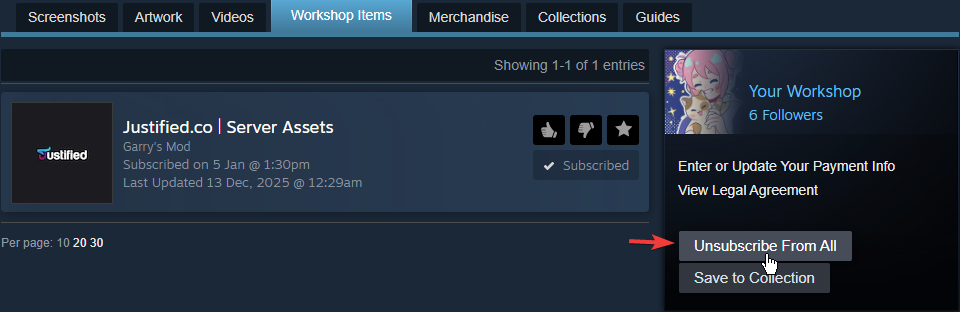
How to Clean Up Addons


Unsubscribe From All
Click Unsubscribe From All to remove everything, then subscribe only to what you need.
Restart GMod
Restart the game to clear cached content.
Common Issues
Quick Reference
- First step: Switch to 64-bit (via Steam Betas tab)
- Video settings: Set everything to Low, enable Multicore Rendering
- Launch options:
-high -novid -nojoy - FPS cap: Lock to your refresh rate (
fps_max 144) - Addons: Unsubscribe from unused addons, use KORDU content packs
- Console: Enable
gmod_mcore_test 1andmat_queue_mode 2
Performance varies by server. Restart GMod when switching between different servers to avoid errors.
Was this page helpful?