
Switch to 64-bit GMod
How to run Garry's Mod in 64-bit mode for better performance and stability
Switch to 64-bit GMod
Running Garry's Mod in 64-bit mode can significantly improve performance, reduce crashes, and allow the game to use more RAM. If you're experiencing stuttering, crashes, or slow load times, switching to x64 is one of the best things you can do.
Why 64-bit?
64-bit GMod can use more than 4GB of RAM, reducing crashes on servers with lots of addons. Most modern PCs should use 64-bit.
How to Switch to 64-bit
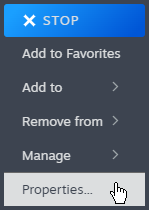

Wait for Download
Close the window. Steam will download the updated files (~500MB).
Launch
When launching, select the 64-bit option if prompted.
What the x86-64 Branch Includes
| Feature | Description |
|---|---|
| 64-bit binaries | Use more than 4GB RAM |
| Experimental multi-threading | Additional performance options |
Benefits of 64-bit
| Benefit | Explanation |
|---|---|
| More RAM usage | Can use 8GB+ instead of being capped at ~3.5GB |
| Fewer crashes | Less likely to run out of memory on heavy servers |
| Better stability | Modern systems are optimized for 64-bit apps |
| Faster loading | Can load more content without hitting limits |
Important Notes
Experimental Branch
The x86-64 branch is still experimental. Most users report improvements, but some experience more crashes than the stable 32-bit version.
Known Considerations
- Stability varies: Some users report more crashes, others report fewer — your experience may differ
- Performance gains are subtle: The main benefit is more RAM, not higher FPS
How to Switch Back to 32-bit
If you encounter problems:
Right-click Garry's Mod → Properties → Betas
Select "None" from the dropdown
Wait for Steam to download the stable 32-bit version
How to Verify You're Running 64-bit
Once in-game:
- Open the console (press ` or ~)
- Type
versionand press Enter - Look for
branch: x86-64andWindows 64bitin the output
Check your output:
Protocol version 24
Network version 2025.03.26 (garrysmod)
Exe build: 19:16:09 Dec  9 2025 (9894) (4000)
GMod version 2025.12.19, branch: x86-64, multicore: 1  ← LOOK HERE
Windows 64bit
Protocol version 24
Network version 2025.03.26 (garrysmod)
Exe build: 15:41:51 Dec 10 2025 (9860) (4000)
GMod version 2025.12.10, branch: unknown, multicore: 0
Windows 32bitLook for branch: x86-64 and Windows 64bit — that's how you know you're on 64-bit.
Troubleshooting
Quick Reference
- How: Steam → Right-click GMod → Properties → Betas → Select "x86-64"
- Verify: Type
versionin console, look for "x64" - Benefits: More RAM, fewer crashes, better stability
- Revert: Change Betas back to "None"
Most players should use 64-bit mode. Only switch back if you encounter specific addon compatibility issues.
Was this page helpful?